Tracking
View your measurements, add new entries, record voice check-ins, and sync Strava.
Add measurement
AI photo measurements
Upload front and side full-height photos. We estimate waist/chest/hips and more.
This uses 1 scan.
Photo specifications (read before you shoot)
- The images must be exactly 810 × 1080 px.
- Subject framed full-height (head near top, feet near bottom). Nothing may clip the edges.
- Camera alignment within ±2° pitch, yaw, and roll (shoot straight-on, no tilt).
- Good lighting, plain background, no clutter or shadows behind the subject.
- Close-fitting clothing (e.g., tight gym wear or underwear).
- Long hair tied back in a bun so it doesn’t add apparent height.
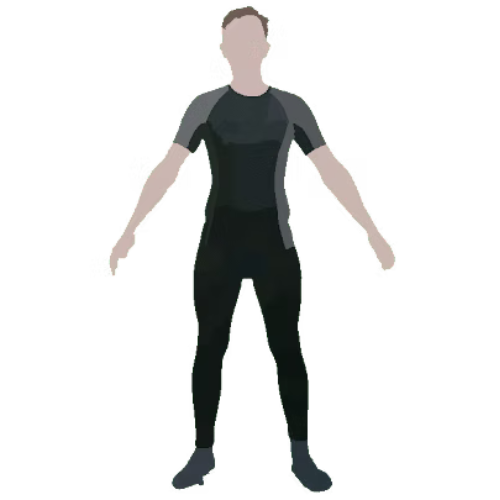
Front pose: stand square to camera, feet shoulder-width apart, arms relaxed by sides (not T-pose or star).
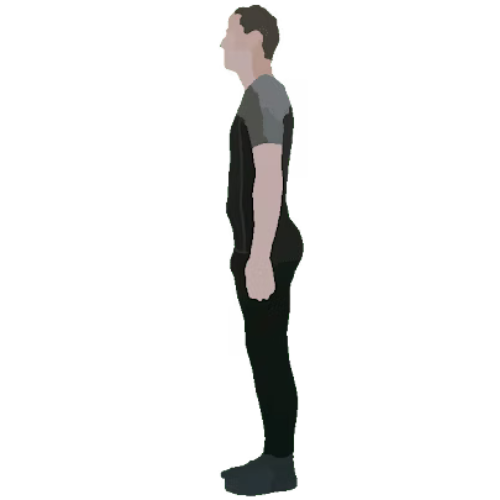
Side pose: stand exactly side-on (no torso twist), feet together, arms by sides and not extending beyond body profile.
Voice journal
Turn your week into a shareable card
Auto-compile your highlights and the latest photo into a clean image for Instagram, WhatsApp, and more.
AI summary of your last 7 days with a shareable image.